Connecting Autonomous AI Database Serverless to Oracle Private AI Services Container
AI Vector Search is useful because it lets applications find related information by meaning, not

AI Vector Search is useful because it lets applications find related information by meaning, not just by exact words. Most retrieval augmented generation patterns need some version of that flow: turn text, images, or documents into embeddings, store those vectors with the business data, and retrieve the most relevant context before an application calls a model. The practical question is where those embeddings and model calls happen, because many customers are not embedding harmless sample text. They may be embedding support notes, contracts, case summaries, engineering documents, or other data that should not be sent to a public hosted AI endpoint just to make semantic search work.
That is where Oracle Private AI Services Container has value. You can run the model service in the customer environment, expose an OpenAI-compatible endpoint near the database, and let Oracle AI Database call that endpoint when it needs embeddings or generated text. The expensive AI work is offloaded from the database server, but the workload still runs close to the data. That matters for privacy, but it also matters for performance because embedding generation can be moved to a runtime designed for that work, using ONNX Runtime with multi-threading on multi-core CPUs.
The same offload idea also applies to vector indexing. The Private AI Services Container Vector Index Service can create In-Memory Neighbor Graph vector indexes faster by using GPU offload on a remote Linux machine with a GPU. In that model, CREATE VECTOR INDEX can define the REST endpoint and credential for the Private AI Services Container, and most modern NVIDIA GPUs are supported for vector index offload. This post focuses on the embedding endpoint, but the same architecture explains why placing the container next to Autonomous AI Database Serverless matters: the database keeps doing database work, while the AI compute runs on infrastructure sized for the AI task.
The model packaging matters too. The container ships with embedding models, and customers can add other embedding models when they need different accuracy, language, image, or deployment characteristics. That is especially important in air-gapped environments because the customer can prepare the models they need and run the service without depending on a live connection to a public AI provider.
This gets more interesting with Autonomous AI Database Serverless. The database is managed, the container is running on customer-controlled compute, and the REST call from the database to the container should stay private. The goal is not just to start a container. The goal is to show how Autonomous AI Database Serverless can use a private AI endpoint that sits next to the database environment instead of sending embedding requests somewhere else. This post builds on Doug Hood's getting started walkthrough for Oracle Private AI Services Container and Markus Kissling's PL/SQL HTTP example, but focuses on the Autonomous AI Database Serverless networking details that were not obvious until we tested the full path.
The architecture has two separate access paths. Administrators and developers can still use Database Actions when public access is enabled and restricted to approved client networks, while the database-to-container call takes the private VCN path. The operational access path and the AI service path are different by design: a developer can use Database Actions through an allowed public endpoint if that fits the environment, while the database calls the AI service by private DNS name inside the VCN.
Developer or administrator browser
  -> Autonomous AI Database Serverless SQL Worksheet

Autonomous AI Database Serverless private endpoint
  -> private VCN route
  -> VM private DNS name
  -> Oracle Private AI Services Container on port 8080

Administrator SSH
  -> VM public IP
Before using vectors, first prove the database can make a basic REST call to the private AI endpoint:
SELECT UTL_HTTP.REQUEST(
  'http://<private-ai-vm-private-dns-name>:8080/v1/models'
)
FROM dual;
Once that works, the same private path can be used by DBMS_VECTOR to generate an embedding:
SELECT DBMS_VECTOR.UTL_TO_EMBEDDING(
  'hello',
  JSON('{
    "provider": "privateai",
    "url": "http://<private-ai-vm-private-dns-name>:8080/v1/embeddings",
    "host": "local",
    "model": "all-minilm-l12-v2"
  }')
) AS embedding
FROM dual;
The network is doing two jobs at the same time. It needs an operational path for people or automation to manage the database and compute instance, and it needs a private service-to-service path from Autonomous AI Database Serverless to the AI endpoint. That is why this architecture separates public administration from private AI traffic. For a straightforward deployment pattern, this layout keeps the moving parts small:
VCN CIDR: 10.20.0.0/16

Public subnet: 10.20.10.0/24
  - Compute VM running Oracle Private AI Services Container
  - Public IP enabled for SSH
  - Private DNS enabled

Private subnet: 10.20.20.0/24
  - Autonomous AI Database Serverless private endpoint
  - Public access enabled for SQL Worksheet
The VM is in a public subnet in this topology so an administrator can SSH into it directly while building the service. In a stricter customer environment, the same container could run on a private subnet and be managed through Bastion, an internal jump host, or another approved operations path. Either way, Autonomous AI Database Serverless should call the VM private DNS name, not the VM public IP. Your name will be different, but the DNS pattern matters because this is what Autonomous AI Database Serverless resolves through the VCN:
Example: ai-temp-vm.aitemppublic.aitemp.oraclevcn.com
Pattern: <vm-hostname>.<subnet-dns-label>.<vcn-dns-label>.oraclevcn.com
This setup works with Security Lists. Network Security Groups are not required, but they are often cleaner for customer deployments because you can attach one NSG to the Autonomous AI Database Serverless private endpoint, another NSG to the VM VNIC, and allow traffic from one NSG to the other. Security Lists keep the subnet-level controls explicit, which is useful when you are documenting the path.
The purpose of the security rules is to allow only the paths this configuration needs. SSH comes from an administrator network to the VM public IP in this topology, while the AI call comes from the Autonomous AI Database Serverless private endpoint to the VM private IP on port 8080. Those are different paths, so they need to be allowed in the right places. The critical detail is easy to miss: creating a Security List under the VCN is not enough. The Security List must be attached to the subnet whose traffic it is meant to control. If the rule exists but is not attached to the subnet, the database call can still time out.
For the public subnet, where the VM runs, the rules need to allow administrator SSH and Autonomous AI Database Serverless private endpoint traffic to the container port:
Ingress:
  0.0.0.0/0     TCP 22    SSH to VM
  10.20.0.0/16  TCP 8080  Autonomous AI Database Serverless private endpoint to Private AI HTTP

Egress:
  0.0.0.0/0     All       General outbound access
For the private subnet, where the Autonomous AI Database Serverless private endpoint lives, the database needs egress to the VM subnet on the container port:
Egress:
  10.20.10.0/24 TCP 8080  Autonomous AI Database Serverless private endpoint to VM HTTP
If your policy allows broader egress during setup, you can temporarily simplify private subnet egress:
Egress:
  0.0.0.0/0     All
The traffic path you are enabling is Autonomous AI Database Serverless private endpoint to VM private IP on TCP 8080:
Autonomous AI Database Serverless private endpoint in 10.20.20.0/24
  -> TCP 8080
VM private IP in 10.20.10.0/24
Same-VCN traffic does not need a route table rule between the subnets because the route is implicit. The security list rules still have to allow it.
Create an Oracle Linux VM in the public subnet. The VM is where the Private AI Services Container runs, so it becomes the private model endpoint that Autonomous AI Database Serverless will call. Putting the VM in the public subnet keeps the administration path easy to inspect because you can SSH directly to the public IP, but it does not change the database path. Autonomous AI Database Serverless should still call the VM by private DNS name so the request stays inside the VCN.
Use a shape with enough memory for the container and models. For a small deployment, 2 OCPUs and 24 GB RAM is a reasonable starting point. In our test, the VM had 46 GB RAM.
Enable the public IP for administration and the private DNS record for the database-to-container path:
Public IPv4 address: Yes
Private DNS record: Yes
Hostname: ai-temp-vm
Then SSH into the VM:
ssh -i ~/.ssh/id_rsa opc@<vm-public-ip>
If the boot volume was resized in OCI but the OS still sees a small root filesystem, grow the root volume. This is worth checking before pulling images because container images, extracted setup files, logs, and model files can consume more space than the default root filesystem exposes inside the operating system.
sudo growpart /dev/sda 3
sudo pvresize /dev/sda3
sudo lvextend -r -l +100%FREE /dev/ocivolume/root
df -h /
Install Podman and unzip before pulling and unpacking the container:
sudo dnf install -y podman unzip
podman --version
Doug Hood's getting started post covers the container setup in more depth, including both HTTP and HTTP/SSL modes. The commands below are the short version of the HTTP path we used for Autonomous AI Database Serverless calling the container over a private network path. Starting with HTTP keeps the first milestone focused on the database route, ACLs, subnet rules, VM firewall, and container health. HTTPS is the right production direction, but it adds certificate and wallet handling before you know whether the basic private path works.
The container image is distributed through Oracle Container Registry, so the VM needs to authenticate before it can pull the image. The Oracle account also needs to accept the image license terms in the registry before the pull will work.
podman login container-registry.oracle.com
After login, pull the Private AI image:
podman pull container-registry.oracle.com/database/private-ai:25.1.2.0.0
The setup scripts are packaged inside the container image, so creating a temporary container and copying the zip out gives you the supported setup scripts without keeping that temporary container around:
podman create --name privateai-setup-extract \
  container-registry.oracle.com/database/private-ai:25.1.2.0.0

podman cp \
  privateai-setup-extract:/privateai/scripts/privateai-setup-25.1.2.0.0.zip \
  /home/opc/

podman rm privateai-setup-extract

cd /home/opc
unzip -o privateai-setup-25.1.2.0.0.zip
Start the container in HTTP mode:
mkdir -p /home/opc/privateai
cd /home/opc/setup

./configSetup.sh -d /home/opc/privateai
sudo loginctl enable-linger opc
./containerSetup.sh -d /home/opc/privateai -v 25.1.2.0.0 --http
podman update --restart=always privateai
The setup scripts create the container configuration and start the Private AI service. Enabling lingering lets the user-level container keep running after the SSH session ends, and the restart policy helps the container come back after a reboot. After the container is running, open the VM firewall because the OCI Security List only gets traffic to the VM. The operating system firewall still has to allow the port, and if it blocks 8080, Autonomous AI Database Serverless will still fail to connect.
sudo firewall-cmd --permanent --add-port=8080/tcp
sudo firewall-cmd --reload
Verify the container locally first. This proves that the container is running and serving requests on the VM, but it does not prove that Autonomous AI Database Serverless can reach it yet.
podman ps
curl -i http://localhost:8080/health
curl http://localhost:8080/v1/models
Then verify using the VM private DNS name. That test is a better preview of what Autonomous AI Database Serverless will use. If it fails from the VM, fix the hostname, listener, or local firewall before moving on to database ACLs.
curl -i http://ai-temp-vm.aitemppublic.aitemp.oraclevcn.com:8080/health
The health check should return HTTP 200:
HTTP/1.1 200 OK
content-length: 0
The model list should include embedding models such as:
all-minilm-l12-v2
all-mpnet-base-v2
multilingual-e5-base
multilingual-e5-large
clip-vit-base-patch32-txt
clip-vit-base-patch32-img
Autonomous AI Database Serverless is the caller in this setup. It needs a private endpoint so outbound requests can originate from the VCN. Public access is optional, but useful when developers or DBAs need to open Database Actions from an approved client network. Those two access paths can exist at the same time, so create Autonomous AI Database Serverless with Oracle Database 26ai and private endpoint networking:
Database version: 26ai
Network access: Private endpoint access only
Virtual cloud network: the VCN created for this deployment
Subnet: private subnet
Hostname prefix: a short, stable prefix such as aiadb
Network security groups: select the Autonomous AI Database Serverless private endpoint NSG if you are using NSGs
Allow public access: Enabled only if approved users need Database Actions from outside the VCN
mTLS: Set based on your client access requirements
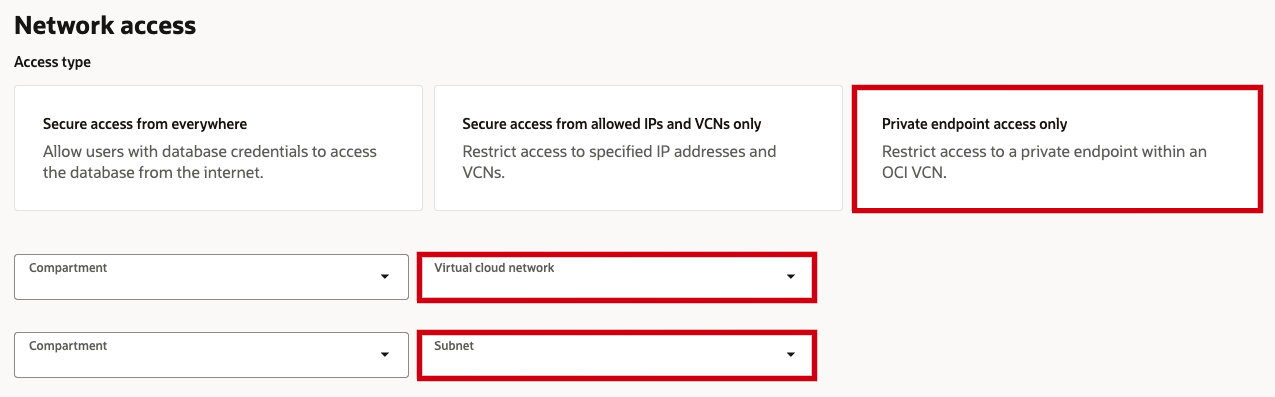
The private endpoint belongs in the private subnet of the VCN you created for this deployment. The hostname prefix is not the hardest setting, but it is worth setting deliberately because it gives the private endpoint a predictable name for SQL examples, troubleshooting, and documentation. If you let the console generate the value, the connection can still work, but the rest of the setup is harder to follow.
The advanced private endpoint options are also where you select NSGs if you are using point-to-point resource rules instead of Security Lists. Choose the NSG that represents the Autonomous AI Database Serverless private endpoint so your VM-side rule can allow traffic from that NSG to the container port. The Allow public access option is in the same advanced network area. Enabling it does not replace the private endpoint path. It adds a public access path for approved users while the database can still use the private endpoint to call the container through the VCN. If the customer manages the database only from inside the VCN, public access can be disabled. The important part for this pattern is that Autonomous AI Database Serverless has a private endpoint in the same VCN as the container endpoint, the allowed public access model matches how administrators will connect, and the database outbound route is set to use the private endpoint path.
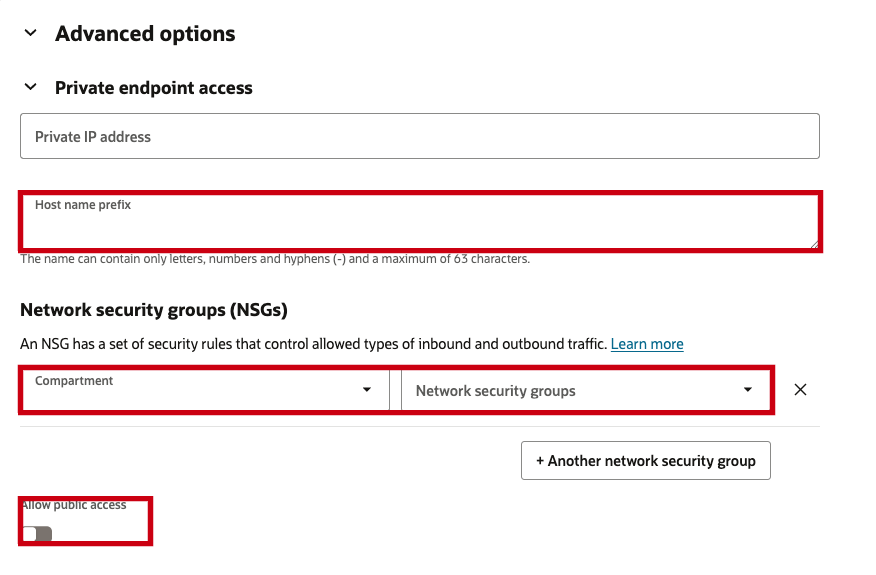
After the database is created, connect as ADMIN and set outbound routing. This setting matters because the database may have both public and private access paths. For the container call, you want outbound connections to use the private endpoint path into the VCN.
ALTER DATABASE PROPERTY SET ROUTE_OUTBOUND_CONNECTIONS = 'PRIVATE_ENDPOINT';
Verify the outbound routing property:
SELECT property_value
FROM database_properties
WHERE property_name = 'ROUTE_OUTBOUND_CONNECTIONS';
The expected value is:
PRIVATE_ENDPOINT
This is the part that matters most. OCI security rules decide whether packets can move through the VCN, but the database also has its own outbound network ACL model. If the database user does not have ACL permission for the target host and port, UTL_HTTP fails before the traffic ever reaches the VM. Use the VM private DNS name, not the VM public IP. In our testing, using the raw private IP caused ORA-01031 even when the ACL rows looked correct. The private DNS name let Autonomous AI Database Serverless resolve the target as a private target and match the ACL correctly.
The ACL needs three privileges for this connection. connect allows the outbound TCP connection, http allows the HTTP request, and resolve allows the database to resolve the private DNS name. The private_target => TRUE argument tells Autonomous AI Database Serverless that this ACL is for a private endpoint target.
Grant connect on port 8080:
BEGIN
  DBMS_NETWORK_ACL_ADMIN.APPEND_HOST_ACE(
    host           => 'ai-temp-vm.aitemppublic.aitemp.oraclevcn.com',
    lower_port     => 8080,
    upper_port     => 8080,
    ace            => xs$ace_type(
      privilege_list => xs$name_list('connect'),
      principal_name => 'ADMIN',
      principal_type => xs_acl.ptype_db
    ),
    private_target => TRUE
  );
END;
/
Grant http on port 8080:
BEGIN
  DBMS_NETWORK_ACL_ADMIN.APPEND_HOST_ACE(
    host           => 'ai-temp-vm.aitemppublic.aitemp.oraclevcn.com',
    lower_port     => 8080,
    upper_port     => 8080,
    ace            => xs$ace_type(
      privilege_list => xs$name_list('http'),
      principal_name => 'ADMIN',
      principal_type => xs_acl.ptype_db
    ),
    private_target => TRUE
  );
END;
/
Grant resolve with no port range:
BEGIN
  DBMS_NETWORK_ACL_ADMIN.APPEND_HOST_ACE(
    host           => 'ai-temp-vm.aitemppublic.aitemp.oraclevcn.com',
    ace            => xs$ace_type(
      privilege_list => xs$name_list('resolve'),
      principal_name => 'ADMIN',
      principal_type => xs_acl.ptype_db
    ),
    private_target => TRUE
  );
END;
/
Verify the ACL entries before testing the call:
SELECT host, lower_port, upper_port, privilege, principal, private_target
FROM dba_host_aces
WHERE host = 'ai-temp-vm.aitemppublic.aitemp.oraclevcn.com'
ORDER BY privilege;
The expected rows should show each privilege for ADMIN with PRIVATE_TARGET set to YES:
CONNECT  ADMIN  YES
HTTP     ADMIN  YES
RESOLVE  ADMIN  YES
Before using DBMS_VECTOR, prove that the database can make a basic REST call. This test is intentionally small because it isolates the hard part: can Autonomous AI Database Serverless reach the private container endpoint over HTTP? If this fails, the problem is networking or ACLs, not vector search.
SET SERVEROUTPUT ON SIZE UNLIMITED

DECLARE
  l_resp VARCHAR2(32767);
BEGIN
  UTL_HTTP.SET_TRANSFER_TIMEOUT(10);

  l_resp := UTL_HTTP.REQUEST(
    'http://ai-temp-vm.aitemppublic.aitemp.oraclevcn.com:8080/v1/models'
  );

  DBMS_OUTPUT.PUT_LINE(SUBSTR(l_resp, 1, 3000));
END;
/
The expected output is a JSON document with the available models. At that point, the test has proven Autonomous AI Database Serverless can reach the private HTTP endpoint.
After the REST test works, call the embeddings endpoint. This is the point where the setup moves from "the database can reach a private HTTP service" to "the database can use that private service for AI Vector Search work."
SET SERVEROUTPUT ON SIZE UNLIMITED

DECLARE
  input CLOB;
  v VECTOR;
BEGIN
  UTL_HTTP.SET_TRANSFER_TIMEOUT(30);

  input := 'hello';

  v := DBMS_VECTOR.UTL_TO_EMBEDDING(
    input,
    JSON('{
      "provider":"privateai",
      "url":"http://ai-temp-vm.aitemppublic.aitemp.oraclevcn.com:8080/v1/embeddings",
      "host":"local",
      "model":"all-minilm-l12-v2"
    }')
  );

  DBMS_OUTPUT.PUT_LINE(SUBSTR(VECTOR_SERIALIZE(v), 1, 3000));
END;
/
The expected output is a serialized vector. That confirms the request reached the Private AI Services Container and returned an embedding to the database:
[-7.49069378E-002,-1.44330524E-002,4.86498736E-002,...]
The full path now looks like this:
DBMS_VECTOR
  -> UTL_HTTP
  -> Autonomous AI Database Serverless private endpoint
  -> VM private DNS name
  -> Private AI Services Container
The easiest way to debug this setup is to separate database permissions from network reachability. ORA-01031 usually means the database ACL did not match. A timeout usually means the request passed the database ACL check but could not reach the container through the network path.
This usually means the database ACL is wrong or not matching the target. Check the ACL rows and make sure the target host is the VM private DNS name and PRIVATE_TARGET is YES.
SELECT host, lower_port, upper_port, privilege, principal, private_target
FROM dba_host_aces
ORDER BY host, privilege;
This means the database got past the ACL check and is now blocked at the network layer. Check the subnet rules, VM firewall, and container listener before changing the PL/SQL again.
Public subnet security list ingress allows 10.20.0.0/16 -> TCP 8080
Private subnet security list egress allows TCP 8080 to the VM subnet
Security lists are attached to the correct subnets
VM firewall allows 8080/tcp
Container is listening on 0.0.0.0:8080
That usually narrows the issue to one of three things:
Autonomous AI Database Serverless outbound routing is not set to PRIVATE_ENDPOINT
Autonomous AI Database Serverless ACL does not use private_target => TRUE
OCI security lists are not attached to the subnets
Those are separate paths. SQL Worksheet can use public Autonomous AI Database Serverless access, while the container call uses the Autonomous AI Database Serverless private endpoint. You can have SQL Worksheet access working while private outbound calls still fail because of security lists or ACLs.
This setup proves that Autonomous AI Database Serverless can call Oracle Private AI Services Container over a private VCN path and use the result through DBMS_VECTOR. That is the useful customer outcome: the database can keep vectors close to the data, the model endpoint can stay inside the customer's network, and expensive embedding generation can be offloaded to compute that sits next to the Autonomous AI Database Serverless environment. Customers can scale or size that compute for the AI workload, use the shipped embedding models or bring additional models, and still keep the runtime inside their security boundary.
The pieces that made it work were:
Optional Autonomous AI Database Serverless public access for SQL Worksheet
Autonomous AI Database Serverless private endpoint for outbound private calls
VM private DNS name as the target
DBMS_NETWORK_ACL_ADMIN with private_target => TRUE
Security lists attached to the correct subnets
Private AI container running in HTTP mode on 8080
HTTP is useful while proving the private network and ACL path. For production, the next step is HTTPS, certificate handling, API key management, and a tighter security model.